

In questo secondo articolo dedicato al mio orologio con Nixie, vi illustrerò come pilotare tali display con un microcontrollore.
Limitare la corrente
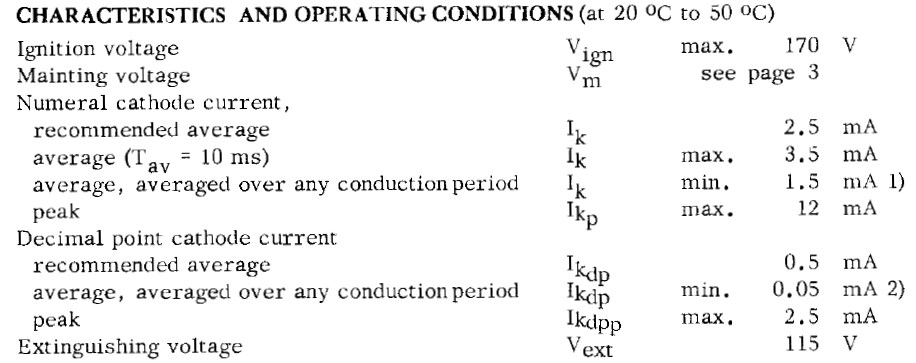
Ogni tubo Nixie è caratterizzato da due valori di tensione:
- tensione di innesco (Vign)
- tensione di mantenimento (Vm)
e da uno o più valori di corrente:
- corrente media/di picco per i numeri (Ik)
- (eventuale) corrente media/di picco per il punto decimale (Ikdp)
E’ possibile trovare questi valori consultando il datasheet:
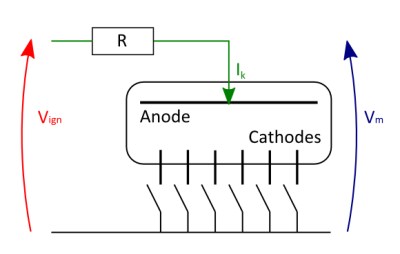
Il classico schema di collegamento del tubo è il seguente:
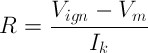
Per il calcolo della resistenza R utilizziamo la seguente formula:
Mentre la potenza dissipata sarà:

Applicando le formule ai valori della mia Nixie ottengo:
- (per i numeri) R = 12Kohm e P = 0,075W
- (per il punto decimale) R = 60Kohm e P = 0,015W
Nel mio orologio non utilizzerò il punto decimale, quindi andrà bene una resistenza da 12Kohm 1/4W.
Driver a transistor
Non è possibile pilotare direttamente un tubo Nixie utilizzando i PIN di output di un microcontrollore: ogni catodo della Nixie non connesso a massa si trova ad una tensione vicina a Vm.
La soluzione più semplice è utilizzare un transistor alla cui base collegare il PIN del microcontrollore.
Non tutti i transistor sono in grado di sostenere l’elevata tensione collettore-base (Vcbo): la scelta più diffusa è il modello MPSA42, che – come recita il datasheet – ha una Vcbo di 300V.
Il collegamento è molto semplice:
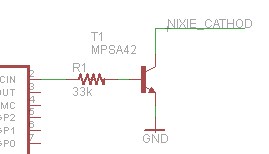
Lo svantaggio di questo approccio è che richiede un transistor per ogni numero, se quindi vogliamo utilizzare 4 Nixie avremo bisogno di almeno 40 transistors.
Driver a circuiti integrati
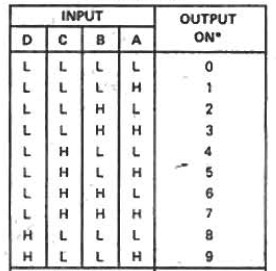
In passato sono stati prodotti diversi circuiti integrati progettati per pilotare le Nixie; i più diffusi sono quelli siglati 7441, 74141 o i loro “cloni” russi K155ID1 e KM155ID1 ed è ancora facile trovarli su eBay. Tutti questi integrati svolgono la funzione di bcd-to-decimal decoder to drive nixie tubes e presentano 4 PIN di input (A/B/C/D) e 10 pin di output (0..9).
Il loro funzionamento è molto semplice: inviando ai 4 PIN di input un numero (da 0 a 9) codificato in binario, viene attivata il relativo pin di output. Tutte le possibili combinazioni sono indicate nel datasheet:
Test
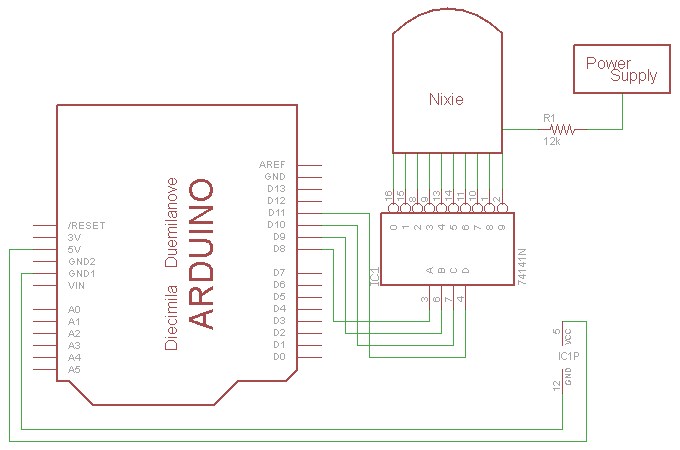
Ho scritto un semplice sketch per Arduino che invia su 4 PIN digitali (D8-D11) la codifica binaria dei numeri da 0 a 9, cambiando numero ogni secondo e tornando a 0 dopo il 9.
Unica nota: per poter cambiare contemporaneamente lo stato dei 4 PIN di output, non utilizzo l’istruzione digitalWrite() ma comando direttamente il registro PORTB come illustrato qui.
void setup() { pinMode(8, OUTPUT); pinMode(9, OUTPUT); pinMode(10, OUTPUT); pinMode(11, OUTPUT); Serial.begin(9600); } void loop() { for(int i = 0; i < 10; i++) { Serial.println(i); PORTB = i; delay(1000); } } |
Ai PIN di Arduino sono collegati gli ingressi A/B/C/D del 74141 e, alle uscite di questo, i catodi della Nixie. L’alimentazione per il circuito integrato (5V) è presa dalla scheda Arduino, mentre la Nixie è alimentata come indicato nell’articolo precedente aggiungendo la resistenza da 12Kohm:

Ecco il circuito in azione:


Hi,
I tried to compile the short sketch in Arduino v1 and 022 but keep getting “lt” error. As you might of guessed i’m new to the Arduino. What am i doing wrong.
Hi Kevin,
could you please post the full error you get?
Hi Luca,
I get the following error:
‘lt’ was not declared in this scope
sketch_jun18a.cpp: In function ‘void loop ()’:
sketch_jun18a:12: error ‘lt’ was not declared in this scope
sketch_jun18a:12: error: expected ‘)’ before ‘;’ token
sketch_jun18a:12: error: name lookup of ‘i’ changed for new ISO ‘for’ scoping
sketch_jun18a:12: error: using obsolete binding at ‘i’
sketch_jun18a:12: error: expected ‘;’ before ‘)’ token
Also I would like to thank you for your guide to SeeedStudio’s Fusion PCB Service. It has made the process of sending suitable board files so much easier, and I’ve been very pleased with the results.
Hi Kevin!
sorry it was my mistake… something went wrong with copy&paste, now the sketch is fixed and you should be able to run it without problems!
Thanks for your feedback!
Hi Luca,
I tried the new code but it still would not compile. I used both Arduino v1 and 022.
Hi Kevin,
did you get the same error?
Hi Luca,
Not sure what went wrong works now with v1. Thank you you have been a great help to someone just starting out with Arduino’s.
Kevin, you’re welcome! 😉
Hi, I have a questio about the circuit schematic.
Where must go the ground cable of the 180V power supply?
In the schematic, there is only 1 cable connected to the power supply. Is not missing the ground cable of the power supply?
Hi
connect the ground of the power supply to the ground of Arduino and 74141 IC.
hi, I have your circuit & sketch running but I’m not seeing an 8 displayed, just a pause. I’ve checked the tube and it works ok & tried 2 74141 IC’s
Any ideas?
Hi, are you using the same power supply I used? Did you connect the ground wire?
Hi, ground is connected and 0,1,2,3,4,5,6,7,9 all work, just the eight missing.
Its a different power supply from http://www.kosbo.com.
I may try playing with the anode resistor – I didn’t have a 12k so used a 10k instead.
Hi Victor,
sorry I misunderstood your message… is 8 working if you connect it directly to power supply, without 74141?
Hey Luca,
Nice post. I’m trying to follow it to test out my nixe tube setup. before I build a nixie clock.
Everything works for a bit, but then I have problems.
Maybe you can help me out?
Here is my dilema:
When I wire everything, it all works for about 10-30 seconds.
I get my nixie tube to display digits 0 to 9 in a loop. All nice so far.
But after about 30 seconds it either gets stuck at 7, completely goes out, or displays almost all digits at the same time. The only way to fix the situation is to go to a new nixie IC driver. I already tried 3 new ICs, think of Einsteins theory of insanity: doing the same thing over and over again and expecting different results. LOL!
I have a strong feeling that I’m burning nixie drivers. Besides for that on my third attempt with a new driver I think I have burned my arduino mini (it just overheats any time I plug it in USB, so I declared it dead…)
I’m using this power supply
http://www.nixieclock.eu/component/virtuemart/power-supply-magic-eye-voltage-dc-115-235v-in14-in16-in18-in12-detail.html
and wiring everything just like in your diagram.
I have used a multimeter to see how much voltage comes out from this power supply to power arduino and IC, its a constant 5 – 5.5V
Any help on how I can test nixie IC drivers that I might have burned, to see if I really burned them or if they are still alive?
I’m more or less a newbie with all of this. Hope my questions are not too lame.
Any thoughts or ideas?
Dan, be sure you used the power supply to power ONLY the nixie tube, not Arduino or the driver: they need 5V (for example power Arduino via USB and the driver using Arduino outputs). Could you send me a drawing of a photo about how you wired the different elements?
Luca,
Sorry it took me a while to respond.
My power supply comes with ports-out for +5v, +12v, +180v, Ground.
I was using power supplys +180v to power the nixie anode.
I was using power supplys +5v and Ground to power arduino and drivers.
Here is a very rough sketch I made with Fritzing.
I could not find some parts in Fritzing library and didn’t want to draw them from scratch, so I just took similar looking things (Magic Eye Power Supply, K155ID1, Nixie)
https://minbox.com/gi/wWvZjxHh7g
Ciao Luca,
sto cercando in giro librerie Altium per il MAX1771 per farne un alimentatore step up DC-DC e poi alimentare una valvola.
Sai dirmi se tale libreria si trova?
Grazie dell´attenzione,
buon pomeriggio
Ciao Cosimo, purtroppo non so dirti: uso Eagle.
Hi Luca,
I’m getting a error saying PORTB was not declared in this scope, sorry I’m all new to this and not sure what this means?
thanks, olly.
Hi Olly,
strange, I’ve just tested the sketch and I can compile it. Which version of the Arduino IDE are you using?
Luca,
the version is 1.5.6 -r2 to work with my Arduino DUE. It’s annoying because your work has helped me a lot with my HNC college project (Nixie Clock) the theory is there I just wanted to get something built and running even if its not a clock! but time is not on my side so i’ll have another play with the code after work to see what can be done.
thanks, olly.
Olly, maybe direct port manipulation is not allowed for Arduino Due.
Anyway the code can be easily changed to use the “normal” commands: in the for() loop use something like:
switch(i) {case 0:
digitalWrite(8, LOW);digitalWrite(9, LOW);digitalWrite(10, LOW);digitalWrite(11, LOW);
break;
case 1:
digitalWrite(8, HIGH);digitalWrite(9, LOW);digitalWrite(10, LOW);digitalWrite(11, LOW);
break;
case 2:
digitalWrite(8, LOW);digitalWrite(9, HIGH);digitalWrite(10, LOW);digitalWrite(11, LOW);
break;
case 3:
digitalWrite(8, HIGH);digitalWrite(9, HIGH);digitalWrite(10, LOW);digitalWrite(11, LOW);
break;
(and so on)
}
Hello, I have your circuit up and running but my nixie is only displaying odd numbers. Any idea why that might be? I have tried 5 of the IC chips that I had and still the nixie counts down 9, 7, 5, 3, 1. I have everything wired like yours. The nixie is not defective because I checked that each digit lights up.
Hi Anthony, are you using the same Nixie I used? It’s strange, the chip just “convert” the input value setting one pin high to light up a particular number of the tube
please tell me you are still alive and fixed the issue
Ciao, per la resistenza calcolata è opportuno usarne una per ognuno dei nixie?
sì, meglio resistenze separate anche per poter eventualmente adattare la luminosità delle varie nixie
Ti disturbo per un ultima cosa, il GND del power supply lo collego a quello dell’arduino o lascio le le masse separate?
collegali insieme
Ciao, sai per caso come poter controllare la luminosità delle nixoe? Devo provare ad aumentare la resistenza oppure devo usare il pwm?
Il problema con il pwm é che non so da dove iniziare purtroppo. Io dispongo di relè che possono commutere 170 vdc, nel caso posso usare anche quelli.
Graize mille.
Ciao, devi usare il PWM ma i relay non commutano abbastanza in fretta: transistor per attivare le nixie con un microcontrollore che invia il PWM, o in alternativa qualcosa tipo questo.
Ciao, grazie per la risposta. Posso usare un pin dell’arduino per il segnale pwm? Io ho 8 nixie, un transistor può bastare o sarebbe meglio disporre un transistor per ogni nixie?
In alternativa al circuito che hai linkato posso usare questo -> https://reibot.org/2011/08/07/intro-to-boost-converter/
Il circuito usa un condensatore da 12v ma io sono riuscito a reperirlo di 16v. Va bene lo stesso?
Scusa per tutte queste domande e grazie in anticipo.